
New: Save customer insights — and put ‘em to work! — with Notes
Notes are a new Olark Live Chat feature to help you capture the insights you gain on chat, share them with your team, and use them to nurture leads and upsell returning customers. Here
Every time you interact with a lead or customer on chat, you learn something new about their goals, preferences, and priorities. From the seemingly minor (e.g., shipping preferences) to the sales and marketing “jackpot” (e.g., a detailed summary of a customer’s motivations for using your product), quick access to customer information can be a game-changer for growing your business…
…so we’re making it easier to store and retrieve it during a chat, with a new feature we call Notes.
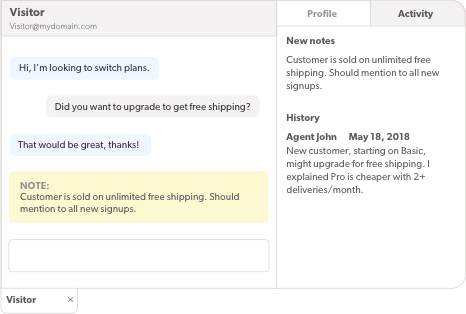
Notes help you capture the insights you gain on chat, share them with your team, and use them to nurture leads and upsell returning customers. Here’s how they work:
• At any time during a chat, you can use the !note command in the chat console to add a note to your conversation
• (if you’re on a paid plan) Notes and transcripts from past conversations with your current visitor are displayed in the chat console sidebar, giving you a quick view of the visitor’s complete chat history
If you’re on a free plan, now is a great time to upgrade to get the full benefit of Notes! A paid plan is less expensive than a daily coffee (and almost as energizing ;-), and includes all the magic of Notes plus lots of other awesome features.
So, next time you uncover a stunning insight while chatting, don’t scrabble for a scrap of paper — try adding a Note, and let us know how it goes!

If you have questions about Notes, just swing by www.olark.com to chat. We’d love to help!