Restyle the Olark AI Agent UI chat button from your own stylesheet
Notes
In the Olark AI Agent UI, you can restyle the chat button from your site’s own CSS. This is CSS, not a JavaScript call, so add it to your stylesheet rather than your Olark install code.
Your custom styling may not carry over to future versions of the chat box. When we release a new version of the chat button, it gets new
::part()names. Your rules then stop applying, and the button falls back to the latest standard look rather than a broken mix of old and new. Check your chat button after Olark updates, and update your CSS if needed.
The chat button and the area that positions it each have a name you can target with ::part():
olark-experience::part(launcher-v1): the chat button itselfolark-experience::part(launcher-container-v1): the area holding the button, in the corner of the page (see the note on position below)
Restyled button
olark-experience::part(launcher-v1) {
  background: #14213d;
  --olark-show-button-fg: #ffffff; /* text and icon color */
  border: 0;
  border-radius: 14px;
  font-family: inherit; /* use your site's font */
  font-size: 16px;
  font-weight: 600;
  box-shadow: 0 8px 20px rgba(20, 33, 61, 0.28);
}
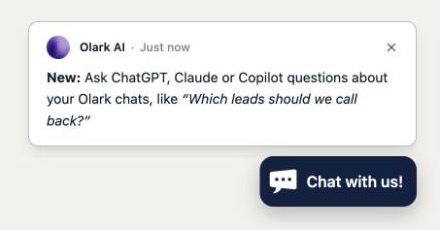
Icon-only button
To show just the icon, without the button text:
olark-experience::part(launcher-v1) {
  font-size: 0;
  gap: 0;
  padding: 8px;
  height: auto;
}
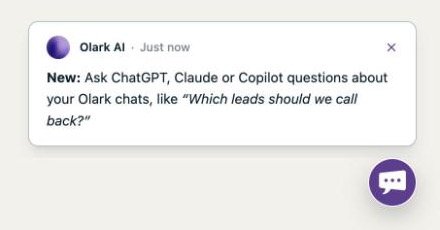
The button shows a chat bubble, or your agents’ photos when agents are online. Screen readers still read the button text.
Things to know
- Keep the button where it is and no taller than it is now. Proactive messages appear just above the button’s standard spot, so moving it with
::part(launcher-container-v1)or making it taller can make the two overlap. - Whenever you change
background, also set--olark-show-button-fgto a color that’s easy to read against it. - To hide the chat button, use
api.box.hide, not CSS. CSS can’t change when the button shows or hides, or remove the outline keyboard users see when it’s focused. - Older selectors such as
#olark-show-buttondon’t reach the Olark AI Agent UI. Use the::part()names above. - The
-v1in each name is the version. A future version of the chat button will use a new name, as described in the note at the top of this page. - This doesn’t apply to the classic Olark chat box. For that, use the other settings on this page, such as Set Theme Color.